What to Consider When Integrating Your Nonprofit Accounting System and Your Fundraising CRM

You’re three minutes into a board meeting when a trustee points out that the fundraising report and the financial statement show two different numbers for the same campaign. You know they should match. They don’t. And you’re not entirely sure why.
For most nonprofits, this traces back to the same root cause: two critical systems not talking to each other the way they should. Your fundraising CRM—the system that captures donations, pledges, and payments—and your accounting system—the source of financial reporting for department heads, the board, grantors, and government—are your two most important systems of record. When they’re out of sync, you see the effects everywhere, including contradictory campaign totals, inconsistent board reports, and transactions that made it into one system but not the other.
Integrating these two systems is possible, and with the right design and process, it’s one of the highest-impact investments your organization can make. Technology has made the mechanics easier than ever, but getting the design right before you build is what separates a working integration from one that creates more problems than it solves.
Step-by-Step: What Data Should Flow Between Systems
These steps are a starting point for identifying the data that should flow between your fund accounting and fundraising systemsand process-related considerations. Knowing that every organization is different and every stakeholder team is unique, you can adjust these steps to suit your organization.
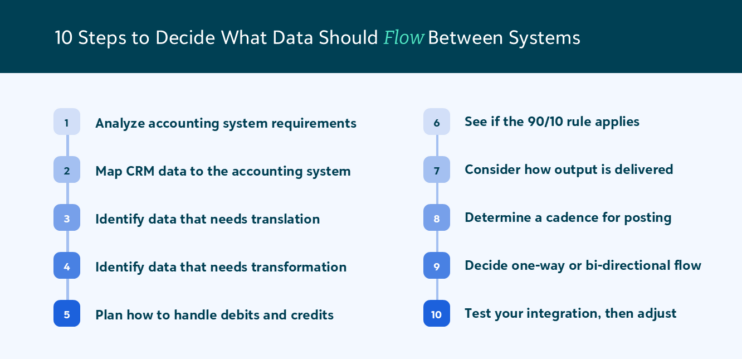
1. Analyze your accounting system’s requirements for journal entries
Typically, integrations are focused on creating journal entries in the GL to record transactions from the CRM. However, if your integration is to an accounting subsidiary ledger, such as Cash Receipts or Accounts Receivable, be sure to analyze the requirements for subledger transactions.
2. Map your CRM data to the accounting system
Identify which data elements from your CRM are needed to meet the requirements of your accounting system. Obvious data include date, amount, transaction type, and restriction. Other data, such as donor or transaction identifiers, may be mapped to a memo or reference field in the accounting system.
3. Identify which CRM data elements need to be translated into accounting data and how those translations will be achieved
For example, some CRMs have locations where accounting data is maintained. Others don’t, so build logic to ensure that the translations meet the accounting system’s requirements. For example, a cash gift to Fund X will debit account 10-1000 and credit account 10-4000, or a pledge to Fund Y will debit account 20-1200 and credit account 20-4000, or a pledge payment always credits accounts receivable.
4. Identify which CRM data elements need to be transformed
Here are two common examples:
- Transform all source dates to the format mm/dd/yyyy and remove any timestamps, and
- Remove all currency symbols from gift amounts and put all amounts in the format 0.00.
5. Understand how you will handle debits and credits
CRM systems typically send one transaction line per donation, but most accounting systems need two—one debit line and one credit line. Determine how you are going to generate a debit and a credit for each transaction line from the CRM and ensure you know if the requirements are different. For example, debits, which are typically to balance sheet accounts, may not need as much coding as credits, which typically post to income statement accounts (unless they are pledge payments).
6. See if the 90/10 rule applies
Determine if your integration is going to address high-volume low-complexity transactions—often 90%+ of all transactions—or every transaction entered into the CRM. It’s okay if the integration does not absorb everything, as long as it addresses your most labor-intensive use-cases. It may be better to handle the most complex items manually.
7. Consider how your output is going to be delivered
How do you want the records sorted and in what order should they be generated? Do you want your transactional output summarized (i.e., aggregated to reduce the number of transactions) or in detail (i.e., a debit and a credit for each individual CRM source transaction).
8. Determine a cadence for posting
Should it be daily, weekly, by deposit, or by payout, and decide how transactions for posting are going to be selected for inclusion.
9. Will the integration be one-way or bi-directional
Determine whether you need a ‘write-back’ for sending any information back from the accounting system to the CRM (e.g., marking gifts as posted once they’ve been sent to the accounting system).
10. Test your integration and adjust
Build and test your integration based on all the information obtained and refined in these steps. This could be by configuring a native integration, using a middleware integration platform built specifically for the purpose of integrating systems, or developing file-based uploads that meet your systems’ requirements.
Lastly, be sure to plan enough time for this project to minimize pressure, and ensure to engage the best stakeholder team from within and outside your organization. Testing and refining your integration may be the most time-consuming aspect, so make sure to account for that.
How to Tell if Your Integration is Actually Working
There are two main ‘tells’ that will indicate if your integration is working effectively.
Operational efficiency and error reduction
As you observe team members (including, perhaps, yourself) no longer spending time on manual activities, spreadsheets, finding and remediating errors, and more expediently transferring or transmitting data from the CRM to the accounting system, you’ll know that the integration has started to work. Key data points include:
- Reduced effort
- Reduced errors
- Quicker transmission of transactional data
Research has consistently shown that the vast majority of business spreadsheets contain errors—a 2024 study put the figure at 94%.
Financial system transaction, reconciliation, and reporting accuracy
Accounting system users and leaders will enjoy the more accurate and expedient receipt of transactional data from the CRM, and that data is grouped in ways that make reconciliation easier and more effective. For example, postings can be grouped to correspond to bank deposits or payment platform payouts. This will allow nonprofit financial statements and other reports to be prepared not only more quickly, but also more accurately and with fewer open questions. And, come audit time, audit trails will be consistent and much easier to follow.
Common Integration Pitfalls and How to Avoid Them
Here are some of the most common issues that I’ve observed with CRM-to-Accounting integrations.
Inadequate scenario testing
Make sure that you test all use cases, including all revenue types, all transactions types (e.g., refunds, adjustments, write-offs), summarization, and platform fees.
Validating before posting
If possible, make sure that your integration makes use of a pre-post process, so that the correct stakeholders can review the posting data before it actually gets posted or transmitted to the accounting system and marked as ‘posted’ in the CRM. Review and correct the posting data before attempting to post it to prevent a litany of errors downstream.
“Set it and forget it” mentality
While your integration project should have an end—it’s live and working—routinely evaluate its effectiveness, because changes may be necessary down the road. For example, if your organization changes banks, you may need to update your chart of accounts and, therefore, need to modify your integration. Integrations are living things.
There are likely other things to be wary of within your own organization. Be sure to address issues as soon as they arise and encourage a culture of collaboration among stakeholders.
A Smarter, More Sustainable Way to Run Your Organization
When your fund accounting system and fundraising CRM work together, like Blackbaud Financial Edge NXT® and Blackbaud Raiser’s Edge NXT®, your team spends less time reconciling data and more time acting on it. The increased efficiency and accuracy build confidence in every report and decision across your organization.
This blog post is an excerpt of the guide, “Why Your Fundraising and Finance Systems Are Telling Different Stories and How to Fix It.” Download it today to learn more about integrating your fund accounting system and fundraising CRM.